

You’ve probably noticed that nearly every new device you buy now ships with a USB-C port. Phones, laptops, tablets, earbuds, even portable blenders. The reason why gadgets use USB-C standard goes well beyond connector shape. A single reversible connector can carry power, high-speed data, and video signals simultaneously, which lets manufacturers cut port count without cutting capability. Add government mandates pushing the entire industry toward one plug, and you have the fastest connector adoption in consumer electronics history.
Table of Contents
- What is USB-C and why is it so popular?
- How regulation accelerated USB-C adoption worldwide
- Understanding USB-C power delivery and data negotiation
- USB-C compatibility myths and practical considerations
- Applying USB-C knowledge when choosing gadgets and accessories
- Why USB-C’s true power lies beyond the plug
- Explore USB-C gadgets and chargers at Zyrox by Uzunov
- Frequently asked questions
Key Takeaways
| Point | Details |
|---|---|
| USB-C versatility | USB-C combines charging, data, and video functions within a single, reversible connector for convenience and compatibility. |
| Regulatory impact | Government mandates like the EU common charger rules accelerate USB-C adoption to reduce waste and unify charging standards. |
| Power delivery negotiation | USB Power Delivery protocols enable dynamic and safe power matching between chargers and devices beyond just the connector shape. |
| Cable capability matters | Not all USB-C cables support the same power or data features; checking protocol support and specifications is essential. |
| Ecosystem standardization | USB-C’s real benefit lies in standardized protocols and global compatibility that reduce vendor lock-in and clutter. |
What is USB-C and why is it so popular?
USB-C is a 24-pin oval connector introduced in 2014. The physical design is reversible, meaning there is no wrong way to plug it in. That alone sounds minor until you consider how many times a day you plug in a cable in the dark or without looking. Fewer failed insertion attempts means less mechanical wear on both the port and the cable tip over time.
The real story is what the connector carries. One reversible connector handles charging power, high-speed data transfer, and video or audio output depending on which protocols the device and cable support. That combination is why gadgets prefer USB-C over older standards that required separate ports for each function.
Here is what USB-C can handle in a single cable run:
- Charging: Up to 240W with USB Power Delivery 3.1, covering everything from earbuds to gaming laptops
- Data transfer: Up to 40 Gbps with USB4 Gen 3, fast enough for external SSDs and 8K video files
- Video output: Up to 8K resolution via DisplayPort Alt Mode or Thunderbolt 4
- Audio: Digital audio signals without a separate headphone jack
- Peripheral control: Keyboard, mouse, and hub connections through a single dock
Slimmer device designs are a direct result of this consolidation. When one port does five jobs, engineers reclaim internal space for larger batteries or thinner chassis. The MacBook Air’s move to USB-C only ports in 2018 was controversial at the time but proved the formula worked. Now the entire industry has followed.
Pro Tip: If you want to reduce cable clutter on your desk, a universal wireless charging stand paired with one USB-C hub handles most daily charging and data needs without a tangle of proprietary cables.
How regulation accelerated USB-C adoption worldwide
Technical advantages alone rarely produce industry-wide change this fast. Regulation did the heavy lifting. The European Union passed a common charger directive in 2022 that set hard deadlines for USB-C compliance across product categories. This is not a recommendation. It is law.

The EU common charger rules require new phones, tablets, digital cameras, headphones, handheld game consoles, and portable speakers to use USB-C starting December 28, 2024, with laptops following on April 28, 2026.
The phased rollout looks like this:
- December 2024: Smartphones, tablets, cameras, headphones, handheld consoles, and portable speakers must ship with USB-C ports
- April 2026: Laptops added to the mandatory list
- Ongoing: Devices must also support USB Power Delivery to qualify as compliant, not just the physical connector
- Scope: Rules apply to all devices sold in EU member states, regardless of where they are manufactured
- Charger bundling: Manufacturers can sell devices without chargers in the box, reducing packaging waste
“The goal is not just standardization for its own sake. It is to reduce the estimated 11,000 tonnes of e-waste generated annually by discarded chargers across the EU.”
The market impact extends well beyond Europe. When a manufacturer redesigns a product line for EU compliance, they typically apply that design globally rather than maintain separate SKUs. This is why the 240W GaN fast charger category has exploded in the past two years. Consumers in the US and Asia benefit from EU regulatory pressure without being subject to it directly.
Understanding USB-C power delivery and data negotiation
The connector is just the handshake. The actual work happens through USB Power Delivery (USB PD), a protocol that lets a charger and a device negotiate exactly how much power to exchange. This is why USB PD standardizes voltage and current profiles dynamically rather than locking both devices into a fixed output.
Here is the sequence every USB-C charging session goes through:
- The charger connects and broadcasts its Source Capabilities, a list of power profiles it can supply (for example: 5V/3A, 9V/3A, 20V/5A)
- The device reads that list and sends a Request for the profile that best matches its battery and charging circuit requirements
- The charger confirms and switches to that profile
- Both devices monitor the connection continuously and renegotiate if conditions change
This negotiation is why a 100W charger does not fry a 20W device. The device simply requests a lower profile and the charger complies.
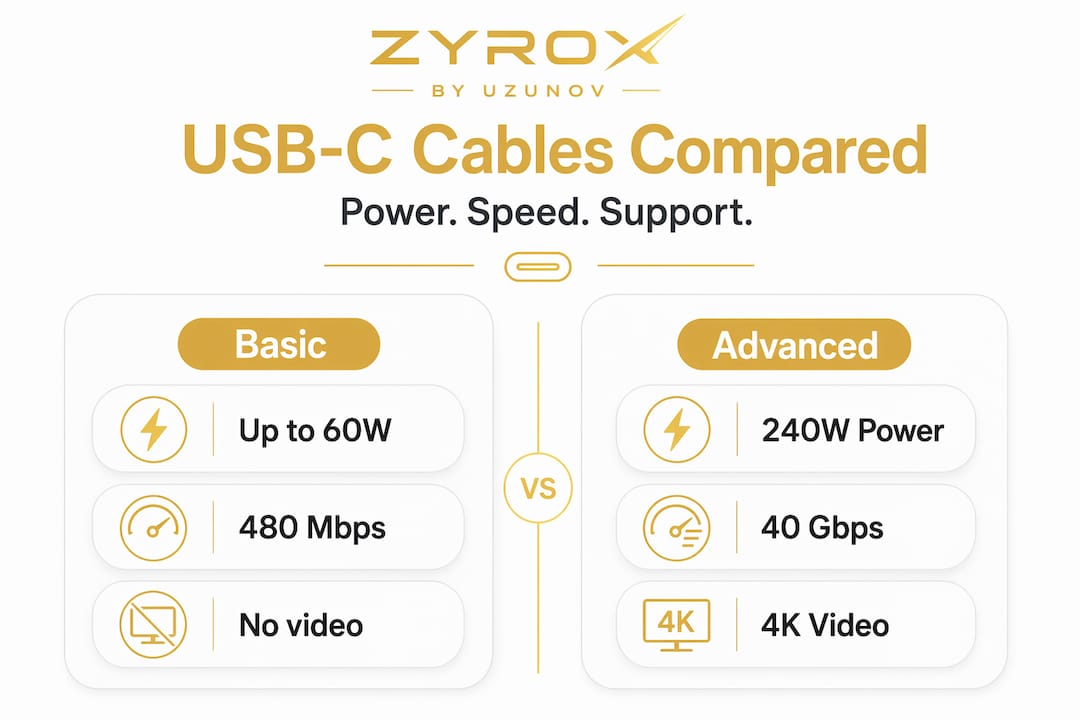
| Cable type | Max power | Max data speed | Video support |
|---|---|---|---|
| USB 2.0 USB-C | 60W (with e-marker) | 480 Mbps | No |
| USB 3.2 Gen 2 USB-C | 100W (with e-marker) | 10 Gbps | Alt Mode capable |
| USB4 Gen 2 USB-C | 240W (with e-marker) | 20 Gbps | Yes |
| USB4 Gen 3 / Thunderbolt 4 | 240W | 40 Gbps | Yes, up to 8K |
Cable ratings matter as much as charger ratings. A cable without an e-marker chip cannot safely carry more than 60W even if both the charger and device support 100W. That chip communicates the cable’s capabilities during the PD negotiation.
Pro Tip: When using a universal mobile phone USB cooler or any USB-C powered accessory, check whether the cable included is rated for the wattage your setup requires. Many bundled cables are USB 2.0 spec and will limit performance.
USB-C compatibility myths and practical considerations
The single biggest source of confusion around USB-C is this: the plug fits, so it should work. It fits, but fitting is not functioning. USB-C is only the physical connector; actual compatibility depends on shared protocols between the cable, charger, and device.
Two cables that look identical can behave completely differently:
- Cable A: USB 2.0 spec, 60W max, no video, costs $4
- Cable B: USB4 Gen 3, 240W, DisplayPort Alt Mode, Thunderbolt 4 certified, costs $30
Both fit every USB-C port on the market. Only one of them will drive an external 4K monitor or fast-charge a laptop.
Here is a quick comparison of what different USB-C use cases actually require:
| Use case | Required protocol | What to check on the cable |
|---|---|---|
| Basic phone charging | USB PD 2.0 or higher | Wattage rating |
| Laptop fast charging | USB PD 3.0, 100W+ | E-marker chip, wattage |
| 4K external display | DisplayPort Alt Mode or Thunderbolt | Alt Mode support listed |
| External SSD transfer | USB 3.2 Gen 2 or USB4 | Data speed rating |
| 8K display or dual 4K | Thunderbolt 4 | Thunderbolt certification |
DisplayPort Alt Mode is not automatic. The port on your device must support it, the cable must carry it, and the display must accept it. All three need to align. Buying a certified cable from a reputable source and checking the spec sheet before purchase prevents most compatibility problems.
A 7.0mm USB-C endoscope camera is a good example of a gadget that uses USB-C purely for data and power without needing Alt Mode. Knowing the use case tells you exactly which cable tier you need.
Applying USB-C knowledge when choosing gadgets and accessories
Knowing the theory is useful. Applying it at purchase time is where it pays off. Here is a practical framework for evaluating any USB-C product before you buy it.
- Identify your device’s power requirement. Check the original charger’s wattage. A laptop that ships with a 65W charger needs a replacement charger with a 65W USB PD profile, not just any USB-C charger.
- Confirm USB PD support on the charger. A charger labeled “USB-C” without USB PD will default to 5V/0.9A, which is slow charging regardless of wattage claims. The PD profile match between charger and device determines actual charging speed.
- Match cable data rate to your use case. Transferring large video files to an external drive? You need USB 3.2 Gen 2 minimum. Browsing the web on a connected keyboard? USB 2.0 is fine.
- Check Alt Mode support if you need video output. Not every USB-C port on a laptop supports DisplayPort Alt Mode. Check the device spec sheet, not just the port shape.
- Use certified or manufacturer-recommended cables for high-power applications. Above 60W, an e-marker chip is required by the USB PD specification. Uncertified cables at high wattage are a safety risk.
- Consider multi-port chargers for travel and desk setups. A single multi-port charger that covers your phone, laptop, and earbuds eliminates three separate power bricks.
Pro Tip: A portable USB rechargeable blender is a useful real-world test for your USB-C setup. If it charges slowly, your cable or charger is likely missing the correct PD profile, which is the same problem that affects your phone and laptop.
Why USB-C’s true power lies beyond the plug
Most coverage of USB-C focuses on the physical connector. Reversible, compact, durable. Those are real advantages, but they are not why USB-C matters at a market level.
The deeper value is protocol standardization. When every device speaks the same power negotiation language, USB PD, one charger can serve a phone, a laptop, a camera, and a portable speaker without any adapter. That is a fundamental shift away from the proprietary charging ecosystems that defined consumer electronics for two decades. Standardization reduces vendor lock-in and makes it practical for one cable ecosystem to serve many device types globally.
The EU directive accelerated this not because regulators are tech experts but because fragmentation was costing consumers real money and generating real waste. The regulation forced the outcome that market competition alone was too slow to produce.
Here is the part most consumers miss: owning a USB-C device does not automatically mean you are inside this interoperable ecosystem. A USB-C port without USB PD support is just a shaped hole. A USB-C cable without the right data rating is just a wire with the right tip. The benefits of USB-C compatibility advantages only materialize when the protocols stack correctly across charger, cable, and device.
The practical implication is this: when buying any USB-C accessory, read the spec sheet before the product description. The spec sheet tells you what the device actually does. The product description tells you what the marketing team wants you to think it does. Those two things are not always the same, and a multi-port USB-C charger that lists its PD profiles explicitly is worth more than one that just says “fast charging” without numbers.
USB-C is the future of device connectivity. But only if you use it correctly.
Explore USB-C gadgets and chargers at Zyrox by Uzunov
Now that you understand why gadgets use USB-C and what to look for in cables and chargers, the next step is putting that knowledge to work with the right products. ZYROX smart gadgets covers a full range of USB-C compatible devices, from accessories to portable appliances, selected for compatibility with current power and data standards.

For fast charging across multiple devices, the 240W GaN USB-C fast charger supports USB PD profiles for phones, tablets, and laptops simultaneously. For a cable-free desk setup, the universal wireless charging stand handles iPhone, Apple Watch, and AirPods in one unit. New arrivals and best sellers updated regularly. Fast shipping across Europe and the US.
Frequently asked questions
Why do most modern gadgets use USB-C instead of older USB types?
Modern gadgets use USB-C because one reversible connector handles fast charging, high-speed data, and video output simultaneously, which reduces port count and simplifies the cable experience for consumers.
Does having a USB-C cable guarantee fast charging or video capability?
No. USB-C is only the connector shape; actual performance depends on whether the cable and charger support the required protocols, such as USB PD for fast charging and DisplayPort Alt Mode for video.
How do regulations affect USB-C adoption in devices?
The EU common charger directive legally requires phones, tablets, cameras, and other devices to use USB-C ports with USB PD compliance starting in 2024, with laptops added to the list in April 2026, reducing e-waste and improving cross-device compatibility.
What should I check when buying USB-C accessories for my devices?
Check the charger’s listed USB PD profiles and wattage, the cable’s data speed rating and e-marker chip status, and whether the cable supports Alt Mode for video if you need display output, since the connector shape alone tells you nothing about actual capability.


